AEGIS Dev Log #1: Eggjam #28 Postmortem
Hi! I’m Eric, and for the game jam known as Eggjam #28, I created a game for the Playdate titled AEGIS. AEGIS is a turn-based roguelike where you control a shield using the Playdate’s crank in order to survive against hordes of enemies. You are currently reading a dev log about it!
I wanted to write this dev log for a few reasons, the first of which is that I believe the design of the game as delivered at the end of the game jam requires a bit of an autopsy. I don’t think it would be controversial to say that the game’s design is fundamentally broken—it gets into degenerate states at a near perfect rate; it does not engender the kind of tough, thinky play I was aiming for; and most importantly, the shield mechanic (the key pitch for the game) completely invalidates any sense of zugzwang, a critical flavor in the genre I’m working in. There are several factors which contribute to these core issues, and in this dev log I aim to put each of them under the microscope, if not the scalpel.
The second reason to write this is that I’ve never written (or at least completed) a dev log for any of my public work before! Some of those projects are far enough in the rearview that producing a dev log would be quite difficult, and the scope and time necessary to accomplish the task quite daunting. I think AEGIS is a perfect candidate for a dev log: the game was in development for just about a month (though my active time on the project was far less), it’s a bite-sized experience in its current state, and it’s fresh enough in my mind that I can remember the way each decision was made.
The third and final reason is that I intend to continue working on AEGIS until it’s a fully-fledged Playdate game! Given the issues with the game jam version raised above, this struck me as a critical moment to assess the game, come up with solutions to the issues with it, and turn those solutions into a plan to continue development. I also decided to a take a bit of a break from development when the jam ended, so this gives me a way to continue thinking on the project while I’m on that break!
This task proved a bit bigger than I expected, so what started as one dev log has become two: this first entry is a postmortem of the Eggjam #28 experience; in it, I walk back through the development process and describe some parts of my process. The second entry is the autopsy, an analysis of the design of the jam game intended to highlight the flaws in the game and present some solutions I intend to explore when continuing development on the full version.
---
First, the context: Eggjam is a game jam hosted by the Discord community for the video game interview podcast The Secret Lives of Games. Next year, SLOG—as the podcast is now affectionately known—is running a year-long series on the games of Michael Brough, titled All Systems Brough. If you’re unfamiliar with Brough and his work, he’s an independent game designer best known for crunchy, small-grid tactical roguelike games such as 868-HACK, Imbroglio, and Cinco Paus. However, his full body of work is remarkably rich and varied—he co-created the generative art tool called BECOME A GREAT ARTIST IN JUST 10 SECONDS, and created games like the arcade-y touch-controlled Helix, meditative exploration game Vesper.5, and cryptic Sokoban-like Corrypt. My attempt to summarize his work here is pitiful—every one of these projects is highly worth your time and attention, and if all that excites you, you should definitely listen along to All Systems Brough while it runs next year. The introductory episode is already out!
This is relevant because Eggjam #28’s theme was “Make a Broughlike.” If it’s not obvious, “Broughlike” is a cheeky name given primarily to Brough’s roguelike games, though as a jam theme, the invitation was open to take inspiration from any of Brough’s games. I’ve wanted to make something in the Broughlike mold for ages now, and when this jam came up, I leapt at the chance to do so.
The idea I decided to run with is one I’d had kicking around ever since I bought my Playdate: a grid-based roguelike where you can rotate some kind of shield around your avatar with the Playdate’s crank in real-time. I thought combining the crunchy turn-based feel of a Broughlike combined with the analog element of the crank direction would result in something unique, and I always thought the concept would work as a way to finally get into developing games for the Playdate. In reality, something in the Broughlike model is exactly what I’ve been looking for on my Playdate, and more than anything, I chose this idea because I wanted to see it exist!
Once these pieces came together, I realized I hadn’t settled on a theme for the game; I’d always just imagined the shield as some kind of abstract sci-fi force shield. I think the first thing to come to me was not the theme, actually, but the title: aegis is the Greek word for shield. After that, a Greek mythological setting was an obvious choice, though it was on my mind not for the reason that might be obvious—I wasn’t playing Hades II like everyone else with a pulse.
Instead, I had read Emily Wilson’s translation of The Iliad over the summer. It was my first encounter with the material, and it floored me—the simplicity and clarity of Homer’s narrative is so rich and heartbreaking, and Wilson’s poetry matches the intensity the source material demands. The whole work continues to resonate with me, but Wilson’s introduction in particular has stuck—a pained and aching paean to the relevance The Iliad still holds for us in the modern day.
Thus, the image of a lone Myrmidon, last of his kin, standing shield in hand against the chthonic forces came to me, and everything clicked.
---
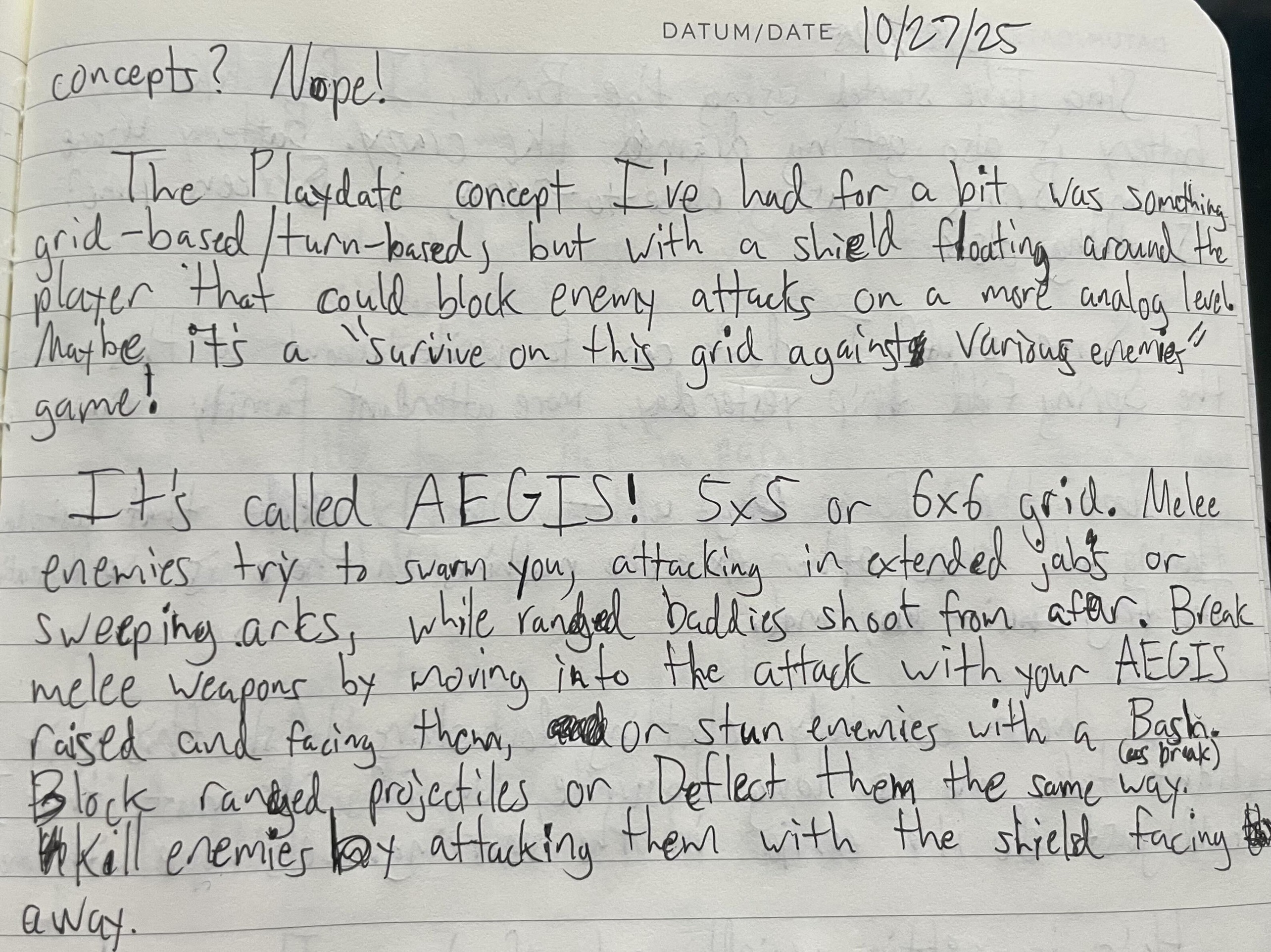
For posterity, I found the exact section of the journal I had written when I finally figured out the idea. From Monday, October 27th, 2025:
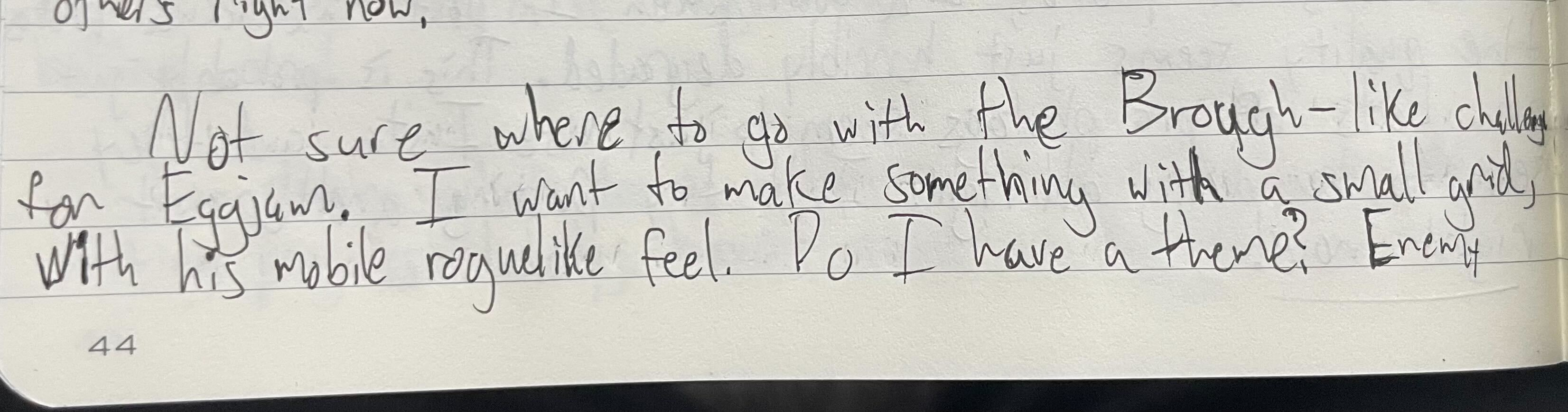
Not sure where to go with the Broughlike challenge for Eggjam. I want to make something with a small grid, with his mobile roguelike feel. Do I have a theme? Enemy concepts? Nope!
The Playdate concept I’ve had for a bit was something grid-based/turn-based, but with a shield floating around the player that could block enemy attacks on a more analog level. Maybe it’s a “survive on this grid against various enemies” game!
It’s called AEGIS! 5x5 or 6x6 grid. Melee enemies try to swarm you, attacking in extended jabs or sweeping arcs, while ranged baddies shoot from afar. Break melee weapons by moving into the attack with your AEGIS raised and facing them, or stun enemies with a Bash. Block ranged projectiles or Deflect them the same way. Kill enemies by attacking them with the shield facing away.
With the concept chosen, I got started setting up the project for the Playdate. SquidGod, a developer who’s made multiple games for the platform, has a great template and associated tutorial for getting started on the Playdate. After a day or so of failing to get the SDK working on my own, I got familiar with the template and used that to get AEGIS rolling.
I spent the first several days getting re-familiarized with Lua (I had used it sparingly in other school projects, but never as the core for a game), as well as coming to grips with Playdate’s rendering and input libraries. Knowing AEGIS would be a grid-based roguelike, I made drawing a grid on screen my first task.
Brough is evidently and self-admittedly fascinated by small grids, and when you start to get deep into games like Imbroglio and Cinco Paus, you quickly begin to understand why: what at first appears impossibly small, and thus incapable of containing much in the way of richness or depth, instead explodes with those qualities—the choices that must be made with each move are so much more consequential when you zoom in as closely as Brough does.
So when I started thinking about grid size, I took the approach I’ve heard Brough himself does: pick a number. As evidenced by the journal entry above, my gut instinct was 5x5, but I did some experimentation with the Playdate’s resolution and dimensions (the screen is 400 pixels wide by 240 pixels tall) to see if a wider grid would be possible. 48x48 seemed a good size for each tile, which perfectly fits 5 tiles vertically, but could go up to 7 horizontally, with a little padding on each side. In the end, I returned to 5x5; I wanted to save some side-screen real estate for any potential user interface or visual embellishment.
---
Next up was the player avatar. I’d become fixated on this idea of “The Myrmidon” as the figure you’d embody; the Myrmidons were the group of Greek soldiers loyal to Achilles in the Trojan War. When Achilles feuds with Agamemnon and refuses to fight the Trojans, the Myrmidons remain with him at camp while the battle rages beyond the Greek fortifications. I’m no scholar of Homeric Greek, but there doesn’t seem to be much further record of what deeds the Myrmidons got up to after the deaths of Achilles and Patroclus—what AEGIS boldly presupposes is that all of them also eventually died. But probably not all at once! And if we zoom in on that last survivor, in the last moments before the thread of his life is cut and his body falls slack, maybe we can find some pathos in his struggle to live. Also, in Greek, myrmidon means “ant,” which I have latched on to as another potent metaphor for the fragility of life and the inevitability of death. Fun!
I started out looking at images of Myrmidon helmets, and trying to transpose them into pixel art in Aseprite. I love Aseprite, but I don’t often use it; I somehow avoided doing much pixel art in my time as a student, and it has not been relevant in my time in AAA, shocking no one. I found giving it a shot again more time-consuming than I expected (though that is truthfully the case with any attempt I make at visual art), but also more fun and creative. Even in the Playdate’s radically limited 1-bit visual style and my choice of a 48x48 sprite, there were a great many choices to make. Mostly, I spent time trying to find the perfect pixel ratios for depicting curves, like in the bottom edge of the helmet and the shield’s arc, but there was just enough opportunity to put my own spin on things.
---
The helmet, being the first sprite I tackled and arguably the most important, went through a number of iterations before I landed on a version I loved. Early versions were pretty impersonal; the fully blacked-out visor was part of the iconic design of the Greek soldier helmets, but left me feeling cold towards the Myrmidon. I added eyes pretty quickly to remedy that, but I soon discovered I wanted some asymmetry in the avatar, just to give it some visual interest (and to prove I could make a sprite that didn’t have the “Mirror in X axis” tool always active). That’s where the gash across the eye first came in—I experimented with leaving the eye underneath still open, but eventually decided that it told a more compelling little story to shut that eye for good.
Pretty quickly, I realized that the only sprite that compared in importance to the helmet was the shield; it’s as much a part of the player character as the helmet is, and it serves an even more critical gameplay function, so once I got the helmet rendering and moving on screen, I got to work on the shield.
Immediately, it became clear that I was thinking about the dimensions of these two components wrong. The first helm was close to 40x40 pixels, small enough to have some padding between the actual grid lines on screen (themselves 2 pixels wide), but this meant that the shield had to be pushed out of the bounds of the player’s grid square. On any other platform, this might not have been an issue, but on Playdate, every pixel on the screen is either black or white, meaning the shield immediately begins to clash with the grid lines visually.
In addition, my initial plan was to use Playdate’s implementation for rotating sprites so the shield could move in a fully analog way, following the angle of the crank exactly—unfortunately, rotating sprites on Playdate very often produces pretty muddy and ugly results, and so, when combined with the aforementioned issue, led me to pursue the solution I ended up sticking with: an 8-directional shield sprite that is paired with a requisite helmet sprite.
It did actually take a bit to realize the helmet should move with the shield; I tried a version where the helmet was small enough to accommodate the shield at all angles, but it just felt silly on the screen. In order to keep a reasonable size for the helmet sprite, it had to move in accordance with the shield.
This choice eventually spawned probably my favorite detail in all of AEGIS (so far): the Myrmidon’s eye following the shield in paranoid agony as you spin it around. It took a bit of pixel-pushing to find the right depiction—I almost went with eyes that were 2-3 pixels tall rather than just 1 pixel because the 1 pixel is so hard to see on Playdate, but eventually decided the detail was worth hiding; hopefully seeing it for yourself on device for the first time will give you a bit of a chuckle!
---
Next up: enemies! Well, one enemy—I briefly considered trying to implement multiple enemy types, as it feels important for the full design of the game to have distinct enemies that can influence your play in different ways, but for the jam version I knew I would only have time to build one. So I went as simple as possible: an enemy that moves toward the player one tile at a time, attacks when directly adjacent dealing one damage, and dies in one hit.
I brainstormed a couple creatures from Greek mythology before settling on the eidolon, which is the ghostly figure you see in the jam version. Eidolons are spirits which typically share the visage of a particular person, often dead but sometimes living. I leaned in this direction because I wanted to further hint at the Myrmidon’s fate—the eidolons he fights are meant to be the emanations of his slain brothers or other war dead, who now seek to pull him down into the depths of the Underworld, making the Myrmidon just another lost soul like them. Also, a ghost enemy in a game like this fits the expectation of the archetype I wanted to build: not so strong that you can’t handle them one-on-one, but threatening if you become gravely outnumbered.
I also considered a revenant, which is a reanimated corpse as opposed to a disembodied spirit, to more clearly illustrate the connection between the Myrmidon and his foes, but couldn’t find a visual design I wanted to pursue, so I stuck with the eidolon. I suspect I will revisit the revenant at a later date!
With my sad, wailing revenant sprite created, I started on the behavior. As what I would describe as an amateur programmer who nevertheless cares somewhat about code cleanliness and doing things the right way, I debated going all-in and making an Enemy class and then inheriting from that class to make the eidolon, but my efforts were frustrated by two facts: 1) I had no idea how to do anything relating to object-oriented programming in Lua, and 2) I had no time to learn how to do anything relating to the above. I learned pretty fast that speed and compromise were the two watchwords of game jam programming—I created my eidolon objects and moved on from there.
---
In keeping with the spirit of speed and compromise, the eidolon’s pathfinding algorithm is extremely naive: if the eidolon is not currently adjacent to the player, they try to find a move that will put them on the same x- and y-coordinate as the player. So if the eidolon is at (1,4) and the player is at (0,2), the eidolon could move up the screen to (1,3) or left to (0,4). If those coordinates are confusing to you, Playdate’s origin is at the top left of the screen—x increases from left to right, while y increases from top to bottom. I mirrored this for my grid layout!
As noted, there are many cases where an eidolon could move in two directions, so it chooses at random from the available valid moves, and then we check if the destination tile is already occupied; if it is, we go with the other valid choice. If an enemy only has one valid choice and that tile is occupied, the enemy stays put—they don’t move for the sake of moving. If you’re keeping track of decisions that will bite me in the ass later, you can put this little nugget on the list.
It’s also worth noting that Playdate’s SDK contains a pathfinder library, and that I did not utilize it. Once again, I strongly considered it, but only on the last day, so I didn’t really have the time required to integrate it into my game. Because there are no static obstacles between tiles and the grid is complete, though, the pathfinding needs for AEGIS are not terribly complex, but this is definitely something I’ll be revisiting in the full game!
---
Here’s a funny anecdote: I had not yet implemented any kind of attack or health and damage system in the game at this point in the project—all I had was the Myrmidon and a couple eidolons following them around the board. However, whenever two entities entered the same tile, one of them stopped acting completely after that. This wouldn’t happen to the Myrmidon, luckily, but two eidolons crashing into one another or the player walking over an enemy would effectively result in the enemy’s death. The reason for this was that the eidolons were acting based on whether their grid tile had an associated “occupant.” If there was an occupant and it was not the player, they would evaluate their move; if there was no tile that referenced that enemy as an occupant, it was like it didn’t exist.
When the player or the enemies move, at the end of their move they clean up their previous tile’s occupant value and then assign themselves as their new tile’s occupant. Thus, when the player walks over an eidolon, the player says “I’m the sole occupant of this tile” and erases the eidolon from the record. When two eidolons walk onto the same tile, the second one overwrites the first as occupant.
Because this bug closely emulates the desired behavior of walking into enemies to kill them, I left it in until I had time to actually implement attacks and health and damage, rather than hack in a fix to a case that should never occur in the first place!
---
We’re now in the last 48 hours of the jam. It’s beginning to dawn on me that time is running out, and it’s at this point that I realize that I have yet to implement the core mechanic of this game: the fucking AEGIS. Panic mounts. “B-b-b-but I can’t even make the shield work without damage and health!” Next task decided: damage and health.
I think because I had been working on enemies for the last couple days, I decided to implement the enemy attack first. Their pathfinding algorithm could already basically detect if the player was adjacent to them, so in the case that they were, they would do 1 point of damage to the player’s health. I made a big heart sprite and smacked them in the empty space of the UI to keep track of the player’s health, with the hearts spawning dynamically based on whatever max health I decided on before running the build.
Of course, at first nothing actually happened when your health hit zero. That was a tomorrow problem.
Obviously, I wanted some amount of feedback for enemies attacking the player, however small. In Michael’s games, enemies just bump into you to deal damage—someone called it “kiss combat” in his Discord server the other day. With the limited fidelity of the Playdate, I knew this would be a totally acceptable solution.
I looked into the Playdate’s Animator system after being scared away earlier on—I have a good amount of experience with Unity’s Animator system, but because of the name similarity I was worried the Playdate solution would be similarly heavy and complex. In reality, it’s quite simple: you create a new Animator based on the movement you want, then update your Animators in the Playdate update and set your sprite’s position based on its Animator’s current value. Setting this up for attacks also let me quickly make enemies move smoothly from one grid tile to another during their movement!
---
The final day. In my morning journal, I detail a task list for the remaining 24 hours. From Sunday, November 23rd, 2025:
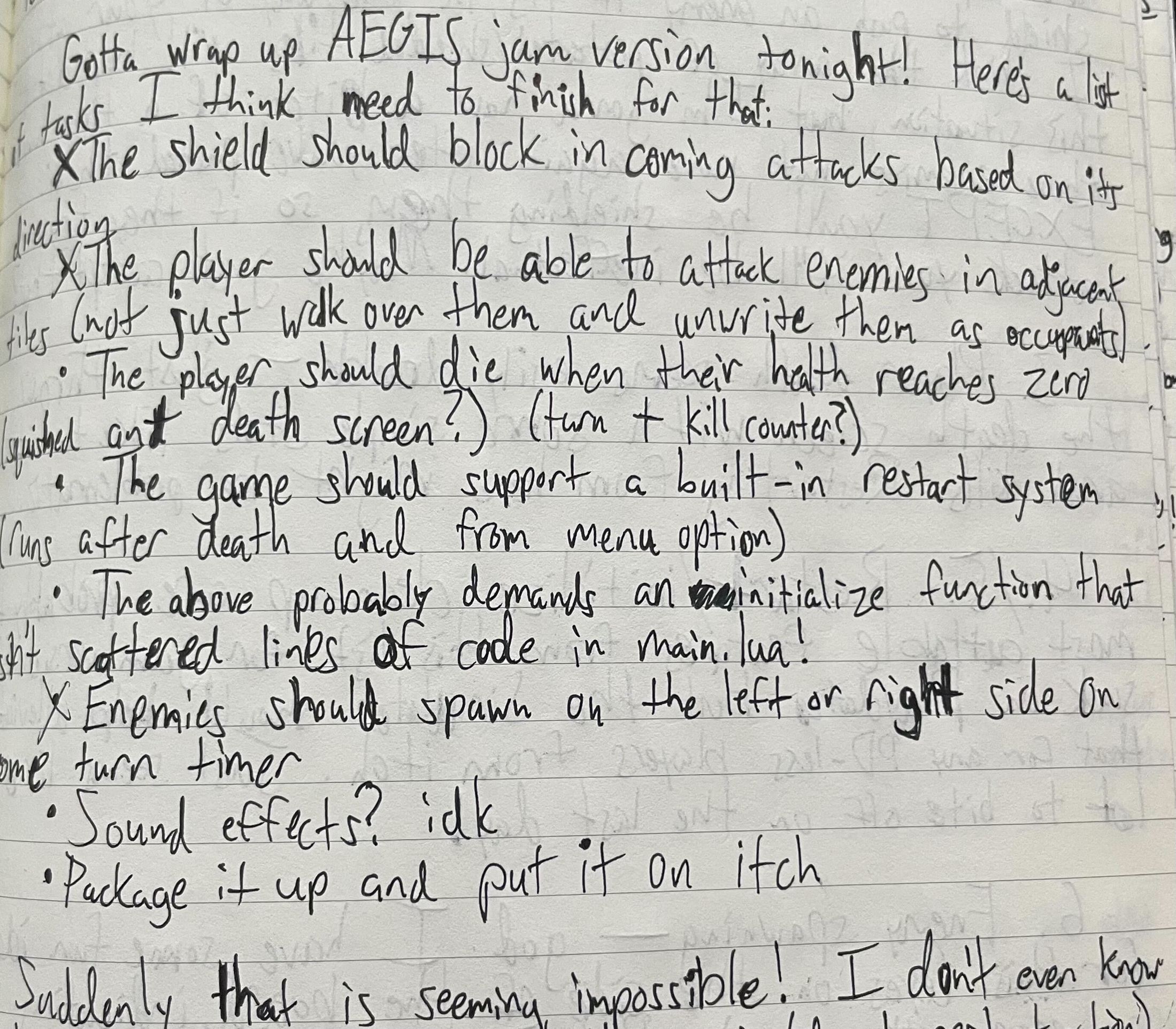
Gotta wrap up AEGIS jam version tonight! Here's a list of tasks I think need to finish for that [sic]:
Suddenly that is seeming impossible!
- The shield should block incoming attacks based on its direction
- The player should be able to attack enemies in adjacent tiles (not just walk over them and unwrite them as occupants)
- The player should die when their health reaches zero (squished ant death screen?)
- The game should support a built-in restart system (runs after death and from menu option)
- The above probably demands an actual initialize function that isn’t scattered lines of code in main.lua!
- Enemies should spawn on the left or right side on some turn timer
- Sound effects? idk
- Package it up and put it on itch
In the remainder of that journal entry, I prioritize these tasks, identifying which ones are cuttable completely (SFX and organizing the atrocious mess that is my initialization sequence) and which need to be done ASAP. I knock out the player attacking enemies pretty quickly (all of the Animator work is transferrable from the enemies, and destroying an enemy object is as simple as making any reference to the enemy nil so Lua deletes it. And so, finally, we get to the shield.
When I was setting up the helmet and shield initially, I set up collision volumes for both components of the player. In Playdate, Sprites are sort of the game object form of Images: an Image is not much more than a set of instructions to be drawn to the screen, but Sprites can be given collision data and can detect collisions based on their draw positions. I wanted to give the shield collision data so I could shape the arc of its protection in each position, and because I envisioned the player deflecting ranged projectiles that could be approaching them from more than the 8 directions of the grid squares. I also wanted to prepare for the possibility that ranged projectiles would move off-grid in amounts of time chunked with the enemy movements, and so I thought the shield being able to collide with them just made more sense than trying to determine collisions using grid coordinates.
Well, as is evident in the jam version, there are no ranged projectiles to be concerned with, and I was quickly discovering that the collision data on the shield did not really help me do what I wanted to do as quickly as I wanted to do it, mostly because I didn’t want to turn melee attacks into physical collisions as well. In the end, I did the thing I initially tried to avoid: the shield has a table that defines the grid tiles it defends relative to the player’s central position. For instance, if the shield is pointed upwards, that element in the shield’s “protectedTiles” table would be {(x=-1, y=-1), (x=0, y=-1), (x=1, y=-1)}.
If you’re looking for any Lua wisdom in this dev log, here’s the one nugget I would offer: sometimes, the best solution to a problem is just to hard-code a table that gives you exactly what you want. When you’re on a deadline, it’s definitely the best solution.
The shield always defends against attacks from three tiles—it forms a straight line at any of the cardinal positions, and an angle at any of the diagonal positions. This aligns somewhat closely with the collision boxes I had defined for the shield, but a bit more generous, because there’s less room for nuance. You can’t really defend half of a tile with the new system!
I knew from the jump that three tiles defended by the shield would be quite powerful, but I still couldn’t anticipate just how ruinous this decision would be for the kind of game I was aiming for. I would learn soon enough.
---
Before I tackled the player death screen, I knew my next highest priority task was getting enemy spawning set up. My main model for this system was Imbroglio, where enemies spawn from the four corners of the map, but before they do so, they peek through a gate indicating where they’ll enter and what kind of enemy they are. I didn’t want to steal this wholesale, but I did inch pretty close.
I was also at a loss for where to start with the rhythm of enemy spawns—I didn’t know how many enemies should spawn at a time, and at what rate, and so on. So, again, I studied Imbroglio. At the start of a run of Imbroglio, one random enemy will be in the process of spawning, then another will spawn after a number of moves, somewhere between 8 and 10. The number of turns until the next enemy spawns slowly decrements as you make more and more moves, until eventually an enemy is spawning every 3-4 moves. In Imbroglio, your goal is to manage your weapon levels such that you can handle enemies more swiftly as they continue to spawn faster and faster.
Using those numbers as extremely rough first estimates, I tried to spawn one enemy at a time every 8-9 turns, then bring that number down slowly over time. Instead of spawning enemies at the corners of the board only, I wanted enemies to spawn at any of the tiles on the east and west edges of the board. I love that Imbroglio shows you which enemy is going to spawn where, so I did something similar: a pair of eyes in the darkness, peering out at the tile the enemy intended to spawn at. This is purposefully more vague than Imbroglio’s solution—the eyes don’t communicate what enemy type might spawn—but in a version with only one enemy type, that fact is not so relevant.
Progress was moving smoothly on this feature until I started testing it over slightly longer periods, at which point two things became obvious:
- Enemies are not threatening at all
- There’s a bug which eventually results in all spawners failing to spawn more enemies
Discovering Point #1 was when I realized that the game as designed does not work. I tried increasing the number of enemies spawning per wave to 2, then 3, and realized another quite obvious fact: optimal play in AEGIS consists of moving to a corner as quickly as possible, moving your shield to defend against 1-2 enemies (in a diagonal position it defends two cardinal directions!), and killing any enemy that approaches you from the “undefended” position. The only way you can get hit by an enemy playing optimally is if you somehow get surrounded on all four sides at once, and even then, you can get away with taking only one point of damage!
This is the principal issue I see with AEGIS. Throughout this dev log I’ve noted some of the choices that produced this issue, but the final section is where I’ll really dive into it and talk about how I’m gonna try to solve it, because, as you can see from the jam version, this problem is very much not solved! For now, though, let’s move to Point #2.
---
This spawner bug ended up taking around 4-5 hours of my last day working on the game. The fact that its discovery coincided with also realizing the game design itself was so flawed was such a blow, and that blow was compounded by how tricky the actual issue was to solve. I was dynamically adding spawn locations to a table that would be evaluated every turn; if it was time to start spawning enemies, more locations would be added, and if the locations were already in the table, then an enemy would spawn, but only if their destination tile was unoccupied. If an enemy was blocked from spawning for this reason, the spawn location would remain on the table until they were spawned, then would be removed at the appropriate time.
Eventually, though, if an enemy was ever blocked from spawning for two turns, it would start a chain reaction that would prevent all spawn locations from being considered valid and nothing would fix it. I tried for hours to even figure out what the actual problem was, what thing was happening in this bad case that caused such a response, and never really figured it out. As the deadline loomed and my energy waned, I turned to my tried-and-true, my ride-or-die: I hard-coded a Lua table that defined all ten edge spaces and an associated boolean that determined whether they were actively trying to spawn an enemy or not. Tables!
---
At this point, it had to be past midnight. The jam’s submission deadline was noon the next day, but I didn’t want to risk the chance that I didn’t get up in the morning in time to get the submission prepared, so I settled for one final task before calling it quits: the death screen.
As soon as I landed on the ant connection with the Myrmidon, I had the image of a death screen where an ant was squished in the dirt as the final image of a run of AEGIS. I don’t think my artistic skills were quite up to snuff for the depiction, but it was good to have a clear and simple task for my last. I created the image, added some text showing how many turns you survived and how many enemies you killed, and threw it on screen when your health hit 0.
I also saw an easy save in the Playdate SDK for my refusal to write clean initialization/restart functionality: there’s an SDK function to restart the game! I threw that in and it felt just about how it might if I had programmed it myself (or better). There’s a game loop!
---
And that’s AEGIS! Having had this time to reflect on the project, I have a few thoughts I wanted to share in retrospect. The one that was ringing in my ears for most of that final day (and several days after) was of the perils of leaving your core game loop unfinished until the final day of a jam. I had a month, on-and-off, of working on AEGIS and several things like the death-restart loop, the shield mechanic, enemies spawning were not finished until there were hours left on the clock, not days. I think I put off several of these tasks, identifying a couple of them as some of the more complex tasks in the whole project, but ultimately, they were not as difficult as I’d first anticipated, and waiting as long as I did on them left me so little time to react to their presence and influence on the game as a whole!
Perhaps a more experienced designer than I—one who had worked on more games of this ilk—could have identified all the various traps I was setting for myself throughout development, but for most of us, the way you discover these issues is by making something and then playing and responding to that thing, not just as a tech demo, but as a game. How else can we tell a game is compelling and engaging unless we can try to play it for more than two seconds, do more than move a guy around, spin a shield around him, marvel at pixels flashing across the screen?
The other feeling I have, though, competes with that one, and it’s that I’m just glad I tried to make AEGIS for this jam in the first place! In particular, I’m proud because it represents a number of firsts for me: it’s a game on the Playdate, written in Lua, and in a genre I’ve never worked in before. I’m extremely grateful that Eggjam is a month-long jam, as it gave me not only the time but also the courage to finally tackle all of those things! The jam timeline was extremely generous, the theme was one I’d been itching for for a long time, and the Eggjam community, as well as Secret Lives of Games community at large, is so supportive and welcoming. If it hadn’t been for trying to make this flawed little thing, I would have no idea how to make the AEGIS I want to exist on the Playdate. I hope you’re as excited for that game to one day be real as I am!
Leave a comment
Log in with itch.io to leave a comment.